What Is a Context Graph? Building Conversation Intelligence from Conversations
What Is a Context Graph? Building Conversation Intelligence from Conversations
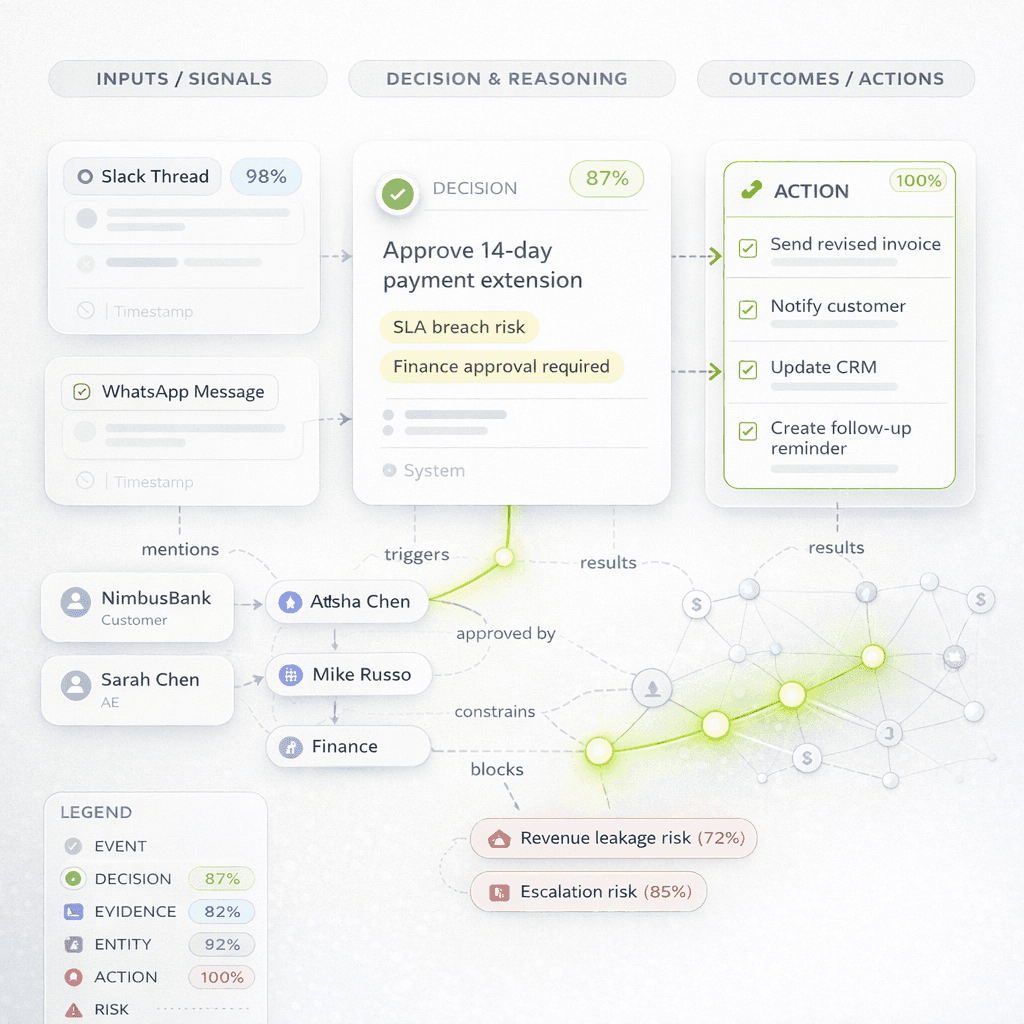
What Is a Context Graph?
How conversations become structured, queryable context for AI systems and enterprise teams
Organisations do not lose information because conversations disappear.
They lose information because decisions, dependencies, ownership changes, and constraints remain trapped inside unstructured communication.
A pricing change gets approved in Slack. A product exception is discussed in email. A customer escalation is acknowledged in a meeting. A follow-up gets promised in a support thread. The information exists, but the context is scattered across channels, people, and timelines.
A Context graph helps by mapping links. It shows how people, decisions, actions, risks, topics, and outcomes connect over time. It doesn't treat communication as separate text. Instead, a context graph arranges conversations into a clear and searchable format.
At Chetto, we create context graphs from conversations using Decision Traces. These records show what the team did. They shared ideas, approved plans, blocked problems, raised concerns, changed details, and acted. This makes organizational memory searchable not by message, but by meaning.
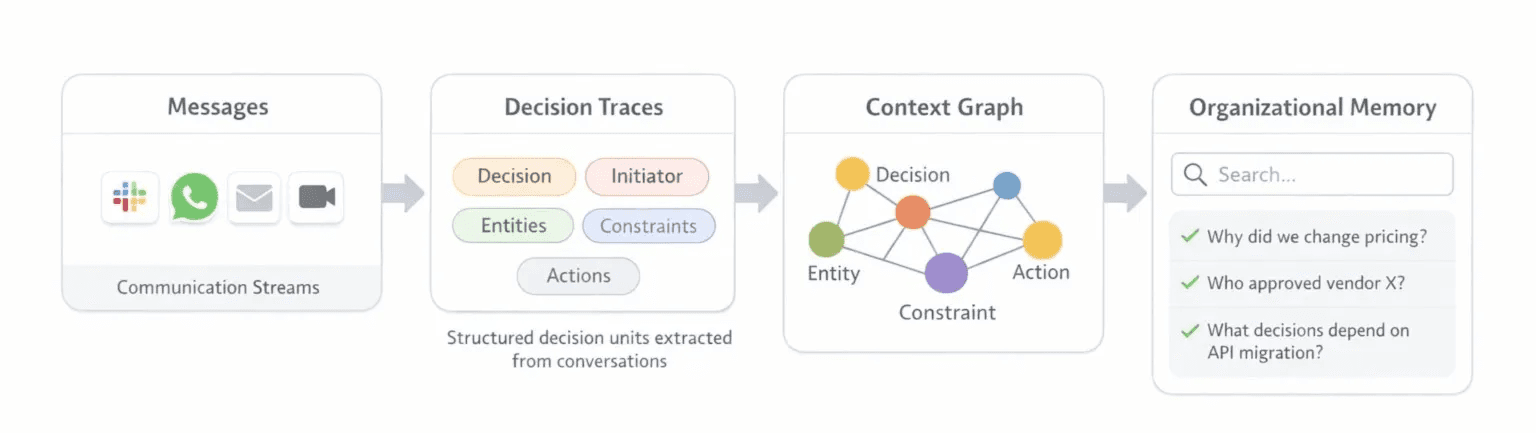
How conversations become a searchable context graph.
Why organizations lose context in conversations?
Most operational knowledge does not live in formal documentation.
It lives in day-to-day communication:
Slack threads
emails
meeting notes
support interactions
customer escalations
internal handoffs
The problem is not a lack of data. The problem is a lack of structure.
Teams might recall a discussion, but they can’t easily answer questions like:
Who approved this decision?
What changed after the customer escalation?
Which constraint blocked execution?
Where did ownership move?
What related decisions happened before this one?
Which conversation explains why this action was taken?
Traditional search can retrieve messages. It usually cannot reconstruct the chain of context behind them.
That is where a context graph becomes useful.
What is a context graph in AI?
In AI systems, a context graph helps move beyond simple document retrieval. It helps the system understand what was said and how context pieces connect.
A context graph can include:
people
teams
customers
projects
issues
approvals
objections
escalations
actions
dependencies
outcomes
The system doesn't store communication as plain text. It also captures relationships like:
who said what
what decision was made
what the decision affected
what blocked progress
what happened next
This makes context retrievable in a way that better matches how real work happens.
Context graph vs Knowledge graph
A knowledge graph usually models entities and factual relationships.
For example:
a customer belongs to an account
a product belongs to a category
a team owns a function
a person reports to a manager
That is useful, but incomplete for operational reasoning.
A context graph goes further by modelling situational and time-sensitive relationships such as:
a decision was proposed
an approval was given
a risk was raised
an escalation changed priority
a promise was made
ownership shifted
a dependency caused delay
A knowledge graph tells you what exists.
A context graph shows what happened, why it happened, what changed, and what comes next.
Why document retrieval alone is not enough
Many AI systems still rely mainly on document retrieval or chunk-based search.
That works well when the answer exists clearly inside a document. It is less effective when context is distributed across many interactions.
For example, a team may need to answer:
Why was the rollout delayed?
Was the customer concern acknowledged?
Who approved the exception?
What earlier conversation explains the current status?
Why is this still unresolved?
The answer may not live in one document. It may be spread across several threads, messages, and meetings.
Document retrieval can return relevant text. But it often misses the structure behind the text:
the decision itself
the actors involved
the sequence of events
the dependency chain
the operational significance
A context graph adds that missing layer.
How Chetto builds context graphs from conversations
At Chetto, we build context graphs from operational communication. We turn conversations into structured, decision-aware memory to enhance understanding and decision-making.
The process looks like this:
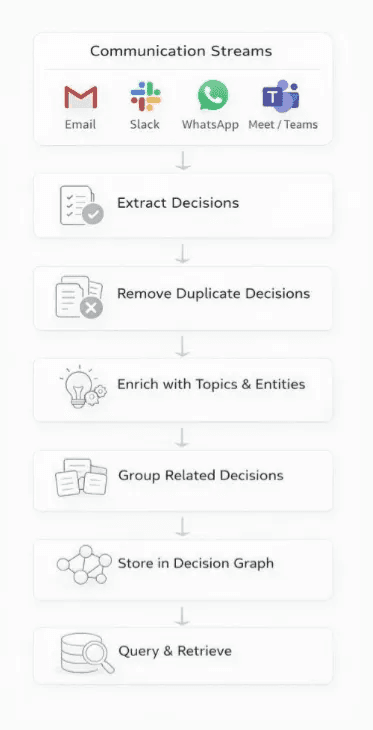
Chetto’s workflow for building context graphs from conversations
1. Extract decisions and operational signals
We identify meaningful units from conversations, such as:
approvals
objections
escalations
ownership changes
action commitments
blockers
timeline changes
follow-ups
This step separates real operational signals from general discussion.
2. Enrich each signal with context
Each extracted item is then enriched with surrounding context, including:
initiator
approver
affected customer or project
related topic
status
time
channel
dependencies
linked follow-ups
This transforms raw text into something machines can reason over.
3. Group related signals into decision chains
A single decision rarely stands alone.
An exception request may connect to:
a prior customer complaint
a product limitation
an internal approval
a delayed action item
a commercial risk
We group these related signals to preserve continuity.
4. Store relationships in a graph structure
Once enriched, the records become nodes and edges. These show operational relationships.
This makes it possible to query not only for text similarity, but for patterns such as:
approvals tied to escalations
unresolved follow-ups after promises
dependencies connected to customer risk
repeated blockers across teams
decisions linked to churn signals
5. Rank by meaning, not only keywords
When users search the system, the goal is not simply to surface any matching message.
The goal is to surface the most meaningful context:
the key decision
the most relevant change
the responsible actors
the timeline
the consequence
That is where a context graph becomes much more valuable than plain archive search.
Decision Traces: Chetto’s building block for context graphs
At Chetto, the core building block of the context graph is the Decision Trace.
A Decision Trace is a clear way to show an important operational event in communication.
It may capture:
what was proposed
why was it proposed
who initiated it
who approved or rejected it
what constraint applied
what dependency existed
what action followed
what outcome it influenced
In practice, Decision Traces help convert conversational noise into operational memory.
For example, instead of storing a thread only as text, the system can represent it as something like:
subject: Pricing API migration
action: migrate to v3
initiator: Rahul
approver: Megha
status: approved
constraint: customer deadline in Q3
dependency: billing integration update
follow-up: rollout plan due Friday
That is much easier to query, connect, and reason over than raw messages alone.
Example: turning a conversation into a context graph
Imagine a conversation that says:
“Rahul recommends migrating the pricing API to v3 before the next enterprise rollout. Megha agrees, but flags that billing integration needs to be updated first. The team commits to a rollout plan by Friday because a customer launch is at risk.”
A regular search system could find this thread if someone looks for “pricing API” or “rollout.”
A context graph can represent the same interaction in a richer way:
a migration decision was proposed
Megha approved it conditionally
billing integration was identified as a dependency
a customer launch risk increased urgency
a Friday commitment created a follow-up obligation
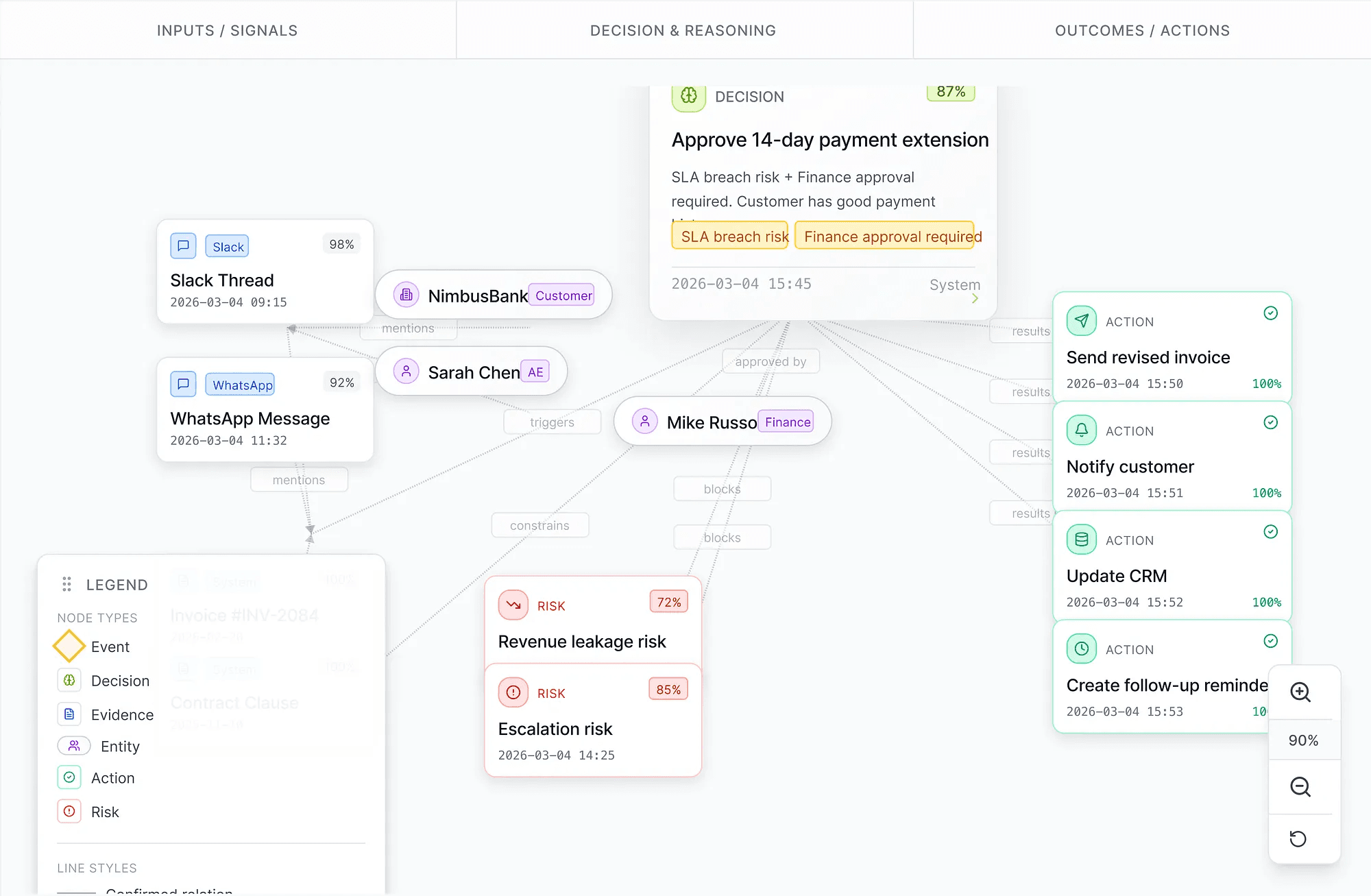
A context graph connecting signals, reasoning, risks, and resulting actions
Now the system can answer more useful questions:
Which approved decisions are blocked by dependencies?
Which customer risks are tied to delayed technical work?
Which commitments were made after an escalation?
What operational context led to this rollout decision?
That is the advantage of context-aware structure.
Use cases for context graphs
Context graphs are useful in settings where key decisions come from communication, not just formal systems.
Customer escalations
Escalations usually start as subtle signs in support threads, account talks, or internal messages.
A context graph helps connect:
customer concern
internal acknowledgment
assigned ownership
promised follow-up
actual resolution status
Ownership tracking
In many organizations, multiple people respond in a thread, but accountability remains unclear.
A context graph can model ownership changes explicitly and show how responsibility moved over time.
Product and engineering decisions
Technical decisions are rarely isolated. They are tied to dependencies, constraints, deadlines, and stakeholder approval.
A context graph helps preserve that full decision chain.
Revenue and retention risk
Churn signals often appear before cancellation:
delayed response
repeated issue recurrence
unresolved escalation
missed commitment
low-confidence handoff
A context graph makes these patterns easier to detect and connect.
Cross-functional execution
Many execution failures occur not due to a lack of intent, but because context breaks down between functions.
A context graph connects sales, support, product, and operations. It ties them together through the same events.
Context graph vs RAG vs GraphRAG
Context graph vs RAG
RAG retrieves documents or text chunks relevant to a query.
That is useful when the answer already exists clearly in content.
A context graph adds a structural layer over the underlying information. It helps represent relationships between decisions, actors, dependencies, and outcomes.
RAG helps retrieve text. A context graph helps preserve situational meaning.
Context graph vs GraphRAG
GraphRAG refers to methods that use graph structures to boost search and reasoning.
A context graph can serve as one of the underlying structures that makes that possible.
In simple terms:
RAG retrieves documents
GraphRAG retrieves through graph-aware structures
Context graph is the relationship model that captures the actual operational context
Context graph vs knowledge graph
A knowledge graph is usually entity-centric. A context graph is more decision- and situation-centric.
That difference matters a lot when the goal is understanding work in motion.
Why context graphs matter for AI agents
AI agents often fail not because they lack language ability, but because they lack the right context structure.
An agent may retrieve relevant messages, yet still miss:
who owns the issue
which decision is current
what changed last
what constraint matters most
what action is blocked
why the action is blocked
Context graphs improve this by giving agents a map of relationships, not just a pile of text.
This matters a lot in enterprise settings, as communication holds the key to operational truth.
Building organizational memory from conversations
Most organizations already have the raw material for better memory.
It exists in the conversations they are already having.
The challenge is turning that communication into something persistent, queryable, and operationally useful.
A context graph changes conversations from passive records into structured memory.
That is the shift:
from messages to meaning
from search to context
from isolated text to connected operational knowledge
Conclusion
A context graph is not just another way to store information.
It shows how real organisational contexts work. This includes people, decisions, constraints, risks, and actions over time.
For teams working across customer communication, operations, support, and execution, that difference matters. Reconstructing why something happened, what changed, and what’s next can be more valuable than just getting one message.
At Chetto, we create context graphs from conversations with Decision Traces. This helps organisations shift from scattered communication to clear, useful context.
FAQ
What is a context graph?
A context graph is a structured representation of relationships between entities, decisions, events, dependencies, constraints, and outcomes over time. It helps systems understand context instead of only storing text.
How is a context graph different from a knowledge graph?
A knowledge graph mainly models entities and factual relationships. A context graph also captures situational relationships such as approvals, escalations, blockers, follow-ups, and ownership changes.
Can a context graph be built from conversations?
Yes. Conversations across Slack, email, meetings, and support systems can be transformed into structured records that capture decisions, actors, dependencies, and outcomes.
Why is a context graph useful for AI?
A context graph helps AI systems retrieve and reason over connected context, not just isolated text. This improves understanding of what happened, why it happened, and what matters next.
What are decision traces?
Decision Traces are Chetto’s structured records of meaningful operational events inside conversations, such as proposals, approvals, constraints, escalations, and follow-up actions.
See how Chetto detects decisions, risks, ownership gaps, and follow-ups across customer and operational communication.

Blog written by
Animesh Srivastava
Co-founder
Animesh Srivastava is our Co-founder and engineer with a strong interest in data, systems design, and applied AI. He enjoys working at the intersection of patterns, system behaviour, and practical problem-solving.
Blog written by
Animesh Srivastava
Co-founder
Animesh Srivastava is our Co-founder and engineer with a strong interest in data, systems design, and applied AI. He enjoys working at the intersection of patterns, system behaviour, and practical problem-solving.
What Is a Context Graph?
How conversations become structured, queryable context for AI systems and enterprise teams
Organisations do not lose information because conversations disappear.
They lose information because decisions, dependencies, ownership changes, and constraints remain trapped inside unstructured communication.
A pricing change gets approved in Slack. A product exception is discussed in email. A customer escalation is acknowledged in a meeting. A follow-up gets promised in a support thread. The information exists, but the context is scattered across channels, people, and timelines.
A Context graph helps by mapping links. It shows how people, decisions, actions, risks, topics, and outcomes connect over time. It doesn't treat communication as separate text. Instead, a context graph arranges conversations into a clear and searchable format.
At Chetto, we create context graphs from conversations using Decision Traces. These records show what the team did. They shared ideas, approved plans, blocked problems, raised concerns, changed details, and acted. This makes organizational memory searchable not by message, but by meaning.
How conversations become a searchable context graph.
Why organizations lose context in conversations?
Most operational knowledge does not live in formal documentation.
It lives in day-to-day communication:
Slack threads
emails
meeting notes
support interactions
customer escalations
internal handoffs
The problem is not a lack of data. The problem is a lack of structure.
Teams might recall a discussion, but they can’t easily answer questions like:
Who approved this decision?
What changed after the customer escalation?
Which constraint blocked execution?
Where did ownership move?
What related decisions happened before this one?
Which conversation explains why this action was taken?
Traditional search can retrieve messages. It usually cannot reconstruct the chain of context behind them.
That is where a context graph becomes useful.
What is a context graph in AI?
In AI systems, a context graph helps move beyond simple document retrieval. It helps the system understand what was said and how context pieces connect.
A context graph can include:
people
teams
customers
projects
issues
approvals
objections
escalations
actions
dependencies
outcomes
The system doesn't store communication as plain text. It also captures relationships like:
who said what
what decision was made
what the decision affected
what blocked progress
what happened next
This makes context retrievable in a way that better matches how real work happens.
Context graph vs Knowledge graph
A knowledge graph usually models entities and factual relationships.
For example:
a customer belongs to an account
a product belongs to a category
a team owns a function
a person reports to a manager
That is useful, but incomplete for operational reasoning.
A context graph goes further by modelling situational and time-sensitive relationships such as:
a decision was proposed
an approval was given
a risk was raised
an escalation changed priority
a promise was made
ownership shifted
a dependency caused delay
A knowledge graph tells you what exists.
A context graph shows what happened, why it happened, what changed, and what comes next.
Why document retrieval alone is not enough
Many AI systems still rely mainly on document retrieval or chunk-based search.
That works well when the answer exists clearly inside a document. It is less effective when context is distributed across many interactions.
For example, a team may need to answer:
Why was the rollout delayed?
Was the customer concern acknowledged?
Who approved the exception?
What earlier conversation explains the current status?
Why is this still unresolved?
The answer may not live in one document. It may be spread across several threads, messages, and meetings.
Document retrieval can return relevant text. But it often misses the structure behind the text:
the decision itself
the actors involved
the sequence of events
the dependency chain
the operational significance
A context graph adds that missing layer.
How Chetto builds context graphs from conversations
At Chetto, we build context graphs from operational communication. We turn conversations into structured, decision-aware memory to enhance understanding and decision-making.
The process looks like this:
Chetto’s workflow for building context graphs from conversations
1. Extract decisions and operational signals
We identify meaningful units from conversations, such as:
approvals
objections
escalations
ownership changes
action commitments
blockers
timeline changes
follow-ups
This step separates real operational signals from general discussion.
2. Enrich each signal with context
Each extracted item is then enriched with surrounding context, including:
initiator
approver
affected customer or project
related topic
status
time
channel
dependencies
linked follow-ups
This transforms raw text into something machines can reason over.
3. Group related signals into decision chains
A single decision rarely stands alone.
An exception request may connect to:
a prior customer complaint
a product limitation
an internal approval
a delayed action item
a commercial risk
We group these related signals to preserve continuity.
4. Store relationships in a graph structure
Once enriched, the records become nodes and edges. These show operational relationships.
This makes it possible to query not only for text similarity, but for patterns such as:
approvals tied to escalations
unresolved follow-ups after promises
dependencies connected to customer risk
repeated blockers across teams
decisions linked to churn signals
5. Rank by meaning, not only keywords
When users search the system, the goal is not simply to surface any matching message.
The goal is to surface the most meaningful context:
the key decision
the most relevant change
the responsible actors
the timeline
the consequence
That is where a context graph becomes much more valuable than plain archive search.
Decision Traces: Chetto’s building block for context graphs
At Chetto, the core building block of the context graph is the Decision Trace.
A Decision Trace is a clear way to show an important operational event in communication.
It may capture:
what was proposed
why was it proposed
who initiated it
who approved or rejected it
what constraint applied
what dependency existed
what action followed
what outcome it influenced
In practice, Decision Traces help convert conversational noise into operational memory.
For example, instead of storing a thread only as text, the system can represent it as something like:
subject: Pricing API migration
action: migrate to v3
initiator: Rahul
approver: Megha
status: approved
constraint: customer deadline in Q3
dependency: billing integration update
follow-up: rollout plan due Friday
That is much easier to query, connect, and reason over than raw messages alone.
Example: turning a conversation into a context graph
Imagine a conversation that says:
“Rahul recommends migrating the pricing API to v3 before the next enterprise rollout. Megha agrees, but flags that billing integration needs to be updated first. The team commits to a rollout plan by Friday because a customer launch is at risk.”
A regular search system could find this thread if someone looks for “pricing API” or “rollout.”
A context graph can represent the same interaction in a richer way:
a migration decision was proposed
Megha approved it conditionally
billing integration was identified as a dependency
a customer launch risk increased urgency
a Friday commitment created a follow-up obligation
A context graph connecting signals, reasoning, risks, and resulting actions
Now the system can answer more useful questions:
Which approved decisions are blocked by dependencies?
Which customer risks are tied to delayed technical work?
Which commitments were made after an escalation?
What operational context led to this rollout decision?
That is the advantage of context-aware structure.
Use cases for context graphs
Context graphs are useful in settings where key decisions come from communication, not just formal systems.
Customer escalations
Escalations usually start as subtle signs in support threads, account talks, or internal messages.
A context graph helps connect:
customer concern
internal acknowledgment
assigned ownership
promised follow-up
actual resolution status
Ownership tracking
In many organizations, multiple people respond in a thread, but accountability remains unclear.
A context graph can model ownership changes explicitly and show how responsibility moved over time.
Product and engineering decisions
Technical decisions are rarely isolated. They are tied to dependencies, constraints, deadlines, and stakeholder approval.
A context graph helps preserve that full decision chain.
Revenue and retention risk
Churn signals often appear before cancellation:
delayed response
repeated issue recurrence
unresolved escalation
missed commitment
low-confidence handoff
A context graph makes these patterns easier to detect and connect.
Cross-functional execution
Many execution failures occur not due to a lack of intent, but because context breaks down between functions.
A context graph connects sales, support, product, and operations. It ties them together through the same events.
Context graph vs RAG vs GraphRAG
Context graph vs RAG
RAG retrieves documents or text chunks relevant to a query.
That is useful when the answer already exists clearly in content.
A context graph adds a structural layer over the underlying information. It helps represent relationships between decisions, actors, dependencies, and outcomes.
RAG helps retrieve text. A context graph helps preserve situational meaning.
Context graph vs GraphRAG
GraphRAG refers to methods that use graph structures to boost search and reasoning.
A context graph can serve as one of the underlying structures that makes that possible.
In simple terms:
RAG retrieves documents
GraphRAG retrieves through graph-aware structures
Context graph is the relationship model that captures the actual operational context
Context graph vs knowledge graph
A knowledge graph is usually entity-centric. A context graph is more decision- and situation-centric.
That difference matters a lot when the goal is understanding work in motion.
Why context graphs matter for AI agents
AI agents often fail not because they lack language ability, but because they lack the right context structure.
An agent may retrieve relevant messages, yet still miss:
who owns the issue
which decision is current
what changed last
what constraint matters most
what action is blocked
why the action is blocked
Context graphs improve this by giving agents a map of relationships, not just a pile of text.
This matters a lot in enterprise settings, as communication holds the key to operational truth.
Building organizational memory from conversations
Most organizations already have the raw material for better memory.
It exists in the conversations they are already having.
The challenge is turning that communication into something persistent, queryable, and operationally useful.
A context graph changes conversations from passive records into structured memory.
That is the shift:
from messages to meaning
from search to context
from isolated text to connected operational knowledge
Conclusion
A context graph is not just another way to store information.
It shows how real organisational contexts work. This includes people, decisions, constraints, risks, and actions over time.
For teams working across customer communication, operations, support, and execution, that difference matters. Reconstructing why something happened, what changed, and what’s next can be more valuable than just getting one message.
At Chetto, we create context graphs from conversations with Decision Traces. This helps organisations shift from scattered communication to clear, useful context.
FAQ
What is a context graph?
A context graph is a structured representation of relationships between entities, decisions, events, dependencies, constraints, and outcomes over time. It helps systems understand context instead of only storing text.
How is a context graph different from a knowledge graph?
A knowledge graph mainly models entities and factual relationships. A context graph also captures situational relationships such as approvals, escalations, blockers, follow-ups, and ownership changes.
Can a context graph be built from conversations?
Yes. Conversations across Slack, email, meetings, and support systems can be transformed into structured records that capture decisions, actors, dependencies, and outcomes.
Why is a context graph useful for AI?
A context graph helps AI systems retrieve and reason over connected context, not just isolated text. This improves understanding of what happened, why it happened, and what matters next.
What are decision traces?
Decision Traces are Chetto’s structured records of meaningful operational events inside conversations, such as proposals, approvals, constraints, escalations, and follow-up actions.
See how Chetto detects decisions, risks, ownership gaps, and follow-ups across customer and operational communication.
Blog written by
Animesh Srivastava
Co-founder
Animesh Srivastava is our Co-founder and engineer with a strong interest in data, systems design, and applied AI. He enjoys working at the intersection of patterns, system behaviour, and practical problem-solving.