Best Way to Centralize Customer Requests Across Email, Slack, WhatsApp and Meetings
Best Way to Centralize Customer Requests Across Email, Slack, WhatsApp and Meetings
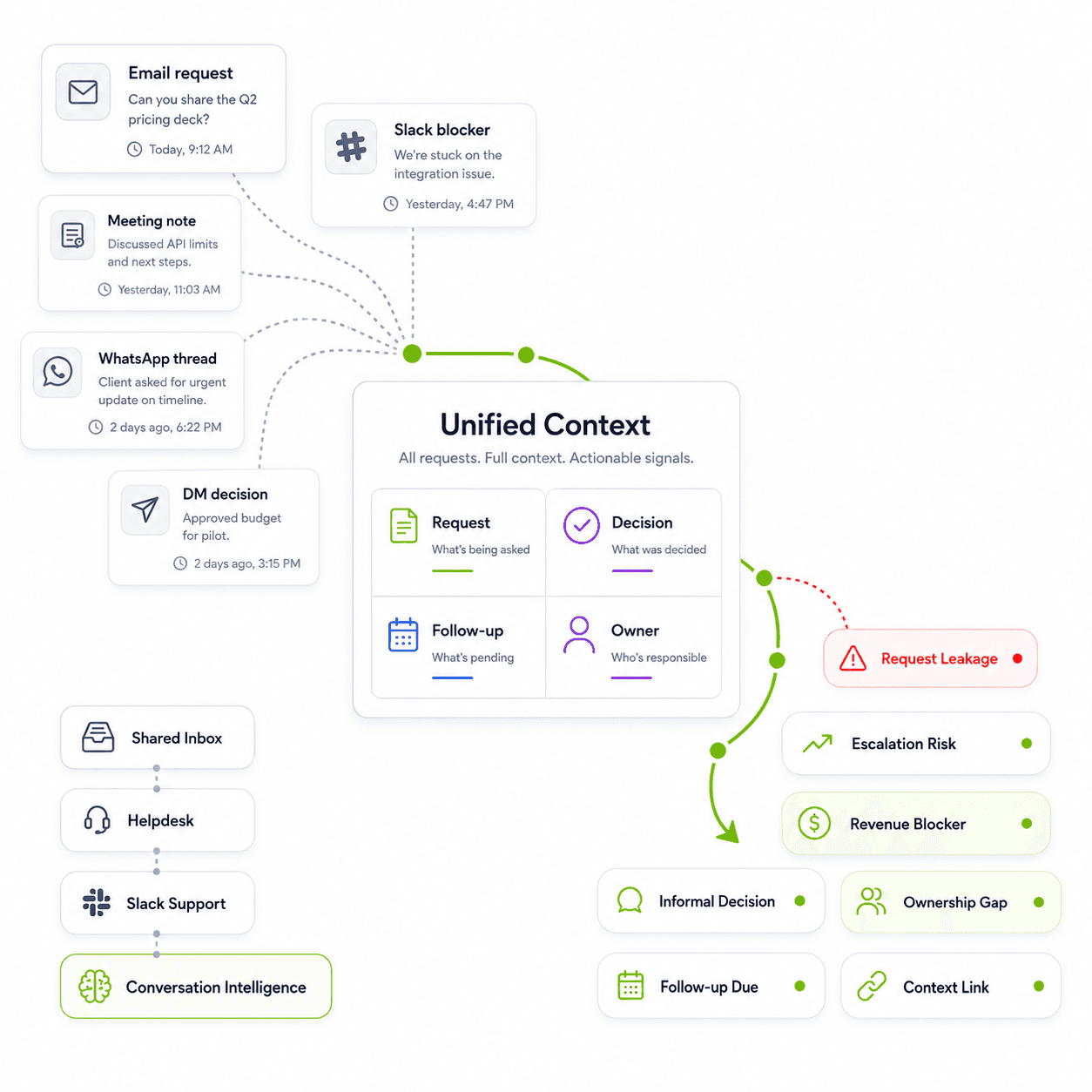
At Chetto, we build conversation intelligence for customer-facing teams that manage relationships across email, Slack, WhatsApp, meetings, CRM notes and internal conversations. This guide is based on a pattern we see repeatedly: customer requests are rarely lost because teams do not care. They are lost because the context around those requests is scattered across too many places.
Most teams do not lose customer requests because they lack another inbox.
They lose them because customer work does not stay inside one inbox.
A customer asks for an update on email. Someone from their team follows up on Slack. A decision changes during a meeting. A payment or renewal concern comes up on WhatsApp. The account manager updates the CRM later, but misses the message where the customer sounded frustrated.
Technically, nothing is lost. Every message exists somewhere.
But practically, the team has lost the thread.
No one knows what changed. No one is sure who owns the next step. The customer has already followed up twice. The renewal is now at risk. And by the time someone realizes the request mattered, the conversation has already turned into an escalation.
That is the real problem Chetto is built for.
Chetto helps teams centralize customer requests by turning scattered conversations into structured customer context. It connects what customers say across email, Slack, WhatsApp, meetings and internal notes, then helps teams see the requests, follow-ups, ownership gaps, escalation signals and revenue risks that need attention.
Because centralizing customer requests is not just about putting messages in one place.
It is about understanding what those messages mean for the customer relationship.
The Old Way of Centralizing Customer Requests Is Breaking
For a long time, customer request management was simple.
A customer sent an email. The team replied. If the issue was important, someone created a ticket. If the account was strategic, someone updated the CRM.
That worked when customer communication was slower and more structured.
But customer conversations now happen everywhere.
They happen in:
Email threads
Slack Connect channels
WhatsApp messages
Google Meet calls
CRM notes
Internal team discussions
Support tickets
Follow-up reminders
Account review conversations
This means the customer request is no longer a single message.
It is a trail of context spread across channels.
A customer may first report an issue through email, then add urgency in Slack, then discuss the business impact during a call, then send a WhatsApp reminder when nothing moves.
If your team only tracks the first message, you are not tracking the real request.
You are tracking the starting point.
What Actually Needs to Be Centralized?
When teams search for the best tools to centralize customer requests, they usually think they need a better inbox, ticketing tool or task system.
Sometimes they do.
But in many customer-facing teams, the real need is deeper.
They need to centralize:
What Teams Need to See | Why It Matters |
Customer requests | So asks do not get buried across channels |
Follow-ups | So customers are not left waiting |
Ownership | So everyone knows who is responsible |
Decisions | So the team knows what changed and why |
Escalation signals | So risk is caught before it becomes visible churn |
Renewal blockers | So revenue risk is not discovered too late |
Expansion signals | So growth opportunities are not missed |
Account context | So every team member understands the customer story |
A normal inbox centralizes messages.
Chetto centralizes the customer context behind those messages.
That difference matters because customer-facing teams do not just need to answer, “Where is the message?”
They need to answer:
What does this customer need?
Who owns the next step?
Is this request stuck?
Is the customer frustrated?
Did the decision change?
Is this connected to renewal, churn or expansion?
What should the team do next?
This is where conversation intelligence becomes more useful than simple message storage.
What We See at Chetto
Across customer-facing teams, the most important customer requests rarely appear as neat, well-labeled tickets.
They usually appear as patterns across conversations.
A customer asks for an update twice. A stakeholder mentions that something was promised last week. Someone asks who owns the issue. A finance or leadership contact gets looped into the thread. The renewal conversation slows down. None of these moments may look dramatic alone, but together they show that the account needs attention.
This is the problem Chetto is built around.
Customer risk usually appears in conversation before it appears in a dashboard. A missed follow-up appears before an escalation. An unclear owner appears before a delayed renewal. A repeated complaint appears before churn risk becomes obvious.
That is why centralizing customer requests should not only mean collecting messages. It should mean making the hidden signals inside those messages visible.
Suggested visual: Add a simple graphic here showing one customer request moving across email, Slack, WhatsApp and a meeting, with Chetto turning those scattered messages into one structured view of request, owner, risk and next step.
The Real Problem: Requests Hide Inside Conversations
Most customer requests do not arrive as clean, well-labeled requests.
They arrive like this:
“Any update on this?”
“This was supposed to be closed last week.”
“Can someone senior look into this?”
“We may need to pause this until this issue is resolved.”
“Looping in finance because this is affecting renewal.”
“Who is owning this from your side?”
None of these messages look like a formal ticket.
But each one carries a business signal.
The customer is waiting. The timeline slipped. Trust is dropping. Ownership is unclear. Renewal may be affected. The account may be moving toward escalation.
A tool that only collects messages may not understand this.
A conversation intelligence platform like Chetto is designed to detect these signals across customer conversations and make them visible to the team.
Why Shared Inboxes and Helpdesks Are Not Always Enough
Shared inboxes and helpdesks are useful. They solve real problems.
A shared inbox helps when multiple people need to manage customer emails together. A helpdesk helps when requests need tickets, SLAs, queues and structured support workflows.
But they are not always enough for modern customer operations.
Here is why.
Tool Type | What It Solves | Where It Breaks |
Shared inbox | Helps teams manage shared email addresses | Misses context from Slack, WhatsApp, meetings and CRM notes |
Helpdesk | Helps teams manage tickets and SLAs | Depends on someone converting the conversation into a ticket |
CRM | Stores account and pipeline information | Often depends on manual updates after the conversation |
Task tool | Tracks assigned work | Does not understand the customer conversation that created the task |
Slack-first support tool | Tracks support requests inside Slack | May miss wider context from email, WhatsApp, meetings and revenue conversations |
Conversation intelligence | Detects signals across conversations | Best when teams need visibility across channels, not just workflow management |
The issue is not that these tools are bad.
The issue is that each tool usually sees only one part of the customer relationship.
Chetto is built for the layer between conversations and action.
It helps teams understand what is happening across customer communication before the signal gets lost, delayed or buried.
What Chetto Does Differently
Chetto is a conversation intelligence platform for customer-facing teams.
It helps teams understand customer conversations across channels and turns scattered communication into structured context.
Instead of only showing a long list of messages, Chetto helps surface the signals that matter.
These include:
Missed customer follow-ups
Unclear ownership
Escalation risk
Churn or renewal risk
Customer dissatisfaction
Delayed responses
Decision changes
Pending next steps
Expansion signals
Repeated unresolved issues
Account-level conversation context
This helps teams move from reactive customer management to proactive customer visibility.
For example, instead of waiting for a customer to escalate, Chetto can help teams notice that the customer has already asked for an update multiple times, mentioned a missed deadline and asked who owns the issue.
That is not just a message thread.
That is a risk signal.
How Chetto Helps Centralize Customer Requests
Chetto helps centralize customer requests by connecting conversations across customer channels and making them easier to act on.
Here is what that looks like in practice.
1. It brings scattered customer communication into one view
Customer requests often move between email, Slack, WhatsApp, meetings and internal notes.
Chetto helps teams see the connected customer context instead of forcing them to search across every channel separately.
This means a team can understand what the customer asked for, what changed later, who responded and what still needs attention.
2. It detects follow-ups before they become escalations
A missed follow-up may look small at first.
But when a customer repeatedly asks for updates, trust starts dropping.
Chetto helps teams identify follow-up gaps across conversations so they can act before the customer becomes frustrated.
3. It shows ownership gaps
Many customer requests get stuck because everyone assumes someone else owns them.
Chetto helps teams see when ownership is unclear, when a next step is pending and when a customer request is waiting without a clear responsible person.
4. It connects requests to business impact
Not every customer message has the same weight.
Some are routine. Some affect onboarding. Some affect renewal. Some indicate churn risk. Some signal expansion.
Chetto helps teams understand which conversations may have business impact, instead of treating every message as the same level of noise.
5. It gives customer-facing teams a shared memory
When account managers, customer success teams, support teams and founders are all involved in customer communication, context gets fragmented quickly.
Chetto creates a shared memory of the customer relationship so teams can understand what happened, what matters and what needs action.
Suggested visual: Add a Chetto product screenshot or mockup here showing customer conversation signals such as pending follow-up, unclear owner, escalation risk or renewal blocker. This helps the blog feel more product-led and trustworthy.
Example: How One Customer Request Gets Lost Without Chetto
Imagine a customer asks over email:
“We need this fixed before the next review.”
The support team sees the email and replies that they are checking. Later, the customer messages the account manager on Slack:
“Any update? This was expected last week.”
During a meeting, the customer mentions that the delay may affect their renewal timeline. The founder hears about the issue in an internal conversation, but the CRM only says “customer requested update.”
Every individual message exists somewhere, but the real customer story is fragmented.
Without Chetto, the team may miss the full signal:
Fragment | Where It Lives | What It Really Means |
Original request | Customer needs a fix before an important review | |
Follow-up | Slack | The customer is waiting and urgency has increased |
Renewal concern | Meeting | The issue may now affect revenue |
Internal discussion | Team chat | Leadership is involved, but ownership may still be unclear |
CRM note | CRM | The account record is incomplete |
With Chetto, these scattered moments become connected customer context. The team can see the request, the follow-up, the ownership gap, the escalation signal and the possible revenue impact in one place.
That is the difference between storing communication and understanding customer conversations.
The Best Tool Depends on the Problem You Are Solving
If you are comparing tools to centralize customer requests, start with the problem first.
Your Problem | What You Need |
“We cannot manage support@ emails properly.” | Shared inbox |
“We need tickets, SLAs and routing.” | Helpdesk |
“Customers ask us for support inside Slack.” | Slack-first support workflow |
“Our CRM does not reflect what actually happened in conversations.” | Conversation intelligence |
“Important customer asks are spread across email, Slack, WhatsApp and meetings.” | Chetto |
“We miss follow-ups and only realize when customers escalate.” | Chetto |
“We need to catch customer risk before churn.” | Chetto |
“We want visibility across customer conversations without micromanaging the team.” | Chetto |
A shared inbox is useful when your communication problem is mostly email.
A helpdesk is useful when your customer requests need strict ticket workflows.
A CRM is useful when you need account records and pipeline data.
Chetto is useful when the real work lives inside conversations and your team needs to understand what is happening across them.
Chetto Is Not Just a Unified Inbox
A unified inbox can bring messages from different channels into one place.
That is helpful, but it is still not the whole answer.
A team can have every message in one view and still miss the important part.
They can still miss that the customer asked three times for an update.
They can still miss that the same issue came up in two different channels.
They can still miss that the buyer is frustrated.
They can still miss that a renewal blocker was mentioned casually in a meeting.
They can still miss that no one owns the next step.
That is why Chetto focuses on conversation intelligence, not just message aggregation.
The goal is not to create another place where teams scroll through customer communication.
The goal is to help teams understand which conversations need action.
Examples of Signals Chetto Can Help Teams Spot
Customer conversations are full of signals that are easy to miss manually.
Signal | What It May Look Like | What It Could Mean |
Missed follow-up | “Any update?” | The customer is waiting and may be losing confidence |
Escalation risk | “Can someone senior step in?” | The issue may be moving beyond normal support |
Ownership gap | “Who is handling this?” | The customer does not know who is accountable |
Renewal risk | “Let’s discuss renewal once this is fixed.” | Revenue may be blocked by unresolved work |
Timeline risk | “This was expected last week.” | The team may have missed a commitment |
Frustration | “We have already raised this before.” | The customer feels unheard |
Expansion signal | “Can another team use this too?” | There may be an upsell or expansion opportunity |
Decision change | “Let’s move ahead with the second option.” | The plan of record has changed |
These are the signals that often sit between tools.
They may not be logged in the CRM. They may not become a ticket. They may not be assigned as a task. But they still matter.
Chetto helps make these signals visible.
Why This Matters for Customer-Facing Teams
Customer-facing teams are usually not short on tools.
They already have CRMs, inboxes, support systems, project boards, meeting notes, chat apps and spreadsheets.
The problem is that the customer story is split across all of them.
This creates four common problems.
1. Leaders do not have visibility
Leaders may only find out about customer risk after the customer escalates, churns or delays renewal.
By then, the warning signs were already present in earlier conversations.
2. Teams depend too much on manual updates
If a team member forgets to update the CRM, create a task or tag a ticket, the signal disappears.
Chetto reduces this dependency by helping extract context from the conversations themselves.
3. Customers repeat themselves
When teams do not have shared context, customers have to explain the same problem again and again.
This makes the experience feel fragmented, even if the team is working hard internally.
4. Revenue risk hides inside ordinary messages
Churn risk does not always start with a dramatic complaint.
Sometimes it starts with a missed follow-up, a delayed response, an unresolved blocker or a stakeholder asking for clarity.
Chetto helps teams catch these early signals before they become bigger account problems.
Where Chetto Fits With Your Existing Stack
Chetto does not need to replace every tool in your stack.
It works best as the conversation intelligence layer across customer communication.
Think of it this way:
Existing Tool | What It Does | How Chetto Helps |
CRM | Tracks accounts, deals and pipeline | Adds real conversation context behind the account |
Helpdesk | Tracks tickets and SLAs | Surfaces signals that may never become tickets |
Slack | Hosts customer and internal conversations | Detects risks, asks and follow-ups inside chat |
Holds long customer threads | Extracts requests, ownership and decisions from the thread | |
Handles fast informal coordination | Captures important asks that may not enter formal tools | |
Meetings | Capture decisions and context | Helps connect spoken decisions to follow-ups and ownership |
Chetto helps teams connect the dots between these systems.
It gives customer-facing teams visibility into what customers are saying, what needs action and what may affect the relationship.
A Simple Way to Think About It
Most tools help you manage work after it becomes structured.
A helpdesk manages a ticket.
A CRM manages an account record.
A project tool manages a task.
But before something becomes a ticket, record or task, it usually starts as a conversation.
That is the layer Chetto focuses on.
Chetto helps teams understand the customer conversation before the signal gets lost.
So instead of asking your team to manually remember every request, update every system and connect every thread, Chetto helps turn conversations into visibility.
Final Takeaway
The best way to centralize customer requests is not just to collect every message in one inbox.
It is to make customer conversations understandable, trackable and actionable.
Shared inboxes, helpdesks and CRMs are useful, but they often depend on clean processes and manual updates. Customer communication is rarely that clean.
Requests move across email, Slack, WhatsApp, meetings and internal notes. Follow-ups get missed. Ownership becomes unclear. Escalation signals appear before anyone logs a ticket. Renewal risk hides inside normal conversation.
That is why teams need conversation intelligence.
Chetto helps customer-facing teams centralize requests, follow-ups, risks, ownership gaps and decisions across the conversations they already have.
It gives teams visibility into what customers need, what is stuck and what could affect the relationship.
Because the real goal is not just to centralize customer requests.
The real goal is to stop losing customer context.
FAQs
What is the best way to centralize customer requests?
The best way to centralize customer requests is to connect the channels where customer conversations actually happen and make the requests, follow-ups, risks and owners visible. For simple email-heavy teams, a shared inbox may work. For ticket-heavy support teams, a helpdesk may work. For teams where customer requests are scattered across email, Slack, WhatsApp, meetings and CRM notes, Chetto provides conversation intelligence across those channels.
How is Chetto different from a shared inbox?
A shared inbox helps teams manage messages from one or more inboxes. Chetto goes beyond message management by helping teams detect customer requests, missed follow-ups, ownership gaps, escalation signals and revenue risks across conversations. It is built for customer context, not just inbox collaboration.
How is Chetto different from a helpdesk?
A helpdesk manages tickets, SLAs and support workflows. Chetto helps teams understand the customer conversations that happen before, around and outside tickets. It can surface important signals from email, Slack, WhatsApp, meetings and internal notes, even when no ticket has been created.
Why do customer requests get lost across teams?
Customer requests get lost because they are spread across multiple channels, ownership is unclear and many tools depend on manual updates. A request may begin in email, continue in Slack, change during a meeting and get followed up on WhatsApp. Without conversation intelligence, teams may miss the full context.
What customer signals can Chetto help identify?
Chetto can help identify missed follow-ups, unclear ownership, escalation risk, renewal blockers, customer dissatisfaction, timeline delays, decision changes and expansion signals. These signals often appear inside normal customer conversations before they become formal tickets or CRM updates.
Who should use Chetto?
Chetto is useful for customer success, account management, support, implementation, operations and revenue teams that manage customer relationships across multiple channels. It is especially helpful for teams that need visibility into customer conversations without relying only on manual updates or micromanagement.
Try Chetto Playground for free and see how conversation intelligence turns scattered customer conversations into structured customer context.

Blog written by
Animesh Srivastava
Co-founder
Animesh Srivastava is our Co-founder and engineer with a strong interest in data, systems design, and applied AI. He enjoys working at the intersection of patterns, system behaviour, and practical problem-solving.
Blog written by
Animesh Srivastava
Co-founder
Animesh Srivastava is our Co-founder and engineer with a strong interest in data, systems design, and applied AI. He enjoys working at the intersection of patterns, system behaviour, and practical problem-solving.
At Chetto, we build conversation intelligence for customer-facing teams that manage relationships across email, Slack, WhatsApp, meetings, CRM notes and internal conversations. This guide is based on a pattern we see repeatedly: customer requests are rarely lost because teams do not care. They are lost because the context around those requests is scattered across too many places.
Most teams do not lose customer requests because they lack another inbox.
They lose them because customer work does not stay inside one inbox.
A customer asks for an update on email. Someone from their team follows up on Slack. A decision changes during a meeting. A payment or renewal concern comes up on WhatsApp. The account manager updates the CRM later, but misses the message where the customer sounded frustrated.
Technically, nothing is lost. Every message exists somewhere.
But practically, the team has lost the thread.
No one knows what changed. No one is sure who owns the next step. The customer has already followed up twice. The renewal is now at risk. And by the time someone realizes the request mattered, the conversation has already turned into an escalation.
That is the real problem Chetto is built for.
Chetto helps teams centralize customer requests by turning scattered conversations into structured customer context. It connects what customers say across email, Slack, WhatsApp, meetings and internal notes, then helps teams see the requests, follow-ups, ownership gaps, escalation signals and revenue risks that need attention.
Because centralizing customer requests is not just about putting messages in one place.
It is about understanding what those messages mean for the customer relationship.
The Old Way of Centralizing Customer Requests Is Breaking
For a long time, customer request management was simple.
A customer sent an email. The team replied. If the issue was important, someone created a ticket. If the account was strategic, someone updated the CRM.
That worked when customer communication was slower and more structured.
But customer conversations now happen everywhere.
They happen in:
Email threads
Slack Connect channels
WhatsApp messages
Google Meet calls
CRM notes
Internal team discussions
Support tickets
Follow-up reminders
Account review conversations
This means the customer request is no longer a single message.
It is a trail of context spread across channels.
A customer may first report an issue through email, then add urgency in Slack, then discuss the business impact during a call, then send a WhatsApp reminder when nothing moves.
If your team only tracks the first message, you are not tracking the real request.
You are tracking the starting point.
What Actually Needs to Be Centralized?
When teams search for the best tools to centralize customer requests, they usually think they need a better inbox, ticketing tool or task system.
Sometimes they do.
But in many customer-facing teams, the real need is deeper.
They need to centralize:
What Teams Need to See | Why It Matters |
Customer requests | So asks do not get buried across channels |
Follow-ups | So customers are not left waiting |
Ownership | So everyone knows who is responsible |
Decisions | So the team knows what changed and why |
Escalation signals | So risk is caught before it becomes visible churn |
Renewal blockers | So revenue risk is not discovered too late |
Expansion signals | So growth opportunities are not missed |
Account context | So every team member understands the customer story |
A normal inbox centralizes messages.
Chetto centralizes the customer context behind those messages.
That difference matters because customer-facing teams do not just need to answer, “Where is the message?”
They need to answer:
What does this customer need?
Who owns the next step?
Is this request stuck?
Is the customer frustrated?
Did the decision change?
Is this connected to renewal, churn or expansion?
What should the team do next?
This is where conversation intelligence becomes more useful than simple message storage.
What We See at Chetto
Across customer-facing teams, the most important customer requests rarely appear as neat, well-labeled tickets.
They usually appear as patterns across conversations.
A customer asks for an update twice. A stakeholder mentions that something was promised last week. Someone asks who owns the issue. A finance or leadership contact gets looped into the thread. The renewal conversation slows down. None of these moments may look dramatic alone, but together they show that the account needs attention.
This is the problem Chetto is built around.
Customer risk usually appears in conversation before it appears in a dashboard. A missed follow-up appears before an escalation. An unclear owner appears before a delayed renewal. A repeated complaint appears before churn risk becomes obvious.
That is why centralizing customer requests should not only mean collecting messages. It should mean making the hidden signals inside those messages visible.
Suggested visual: Add a simple graphic here showing one customer request moving across email, Slack, WhatsApp and a meeting, with Chetto turning those scattered messages into one structured view of request, owner, risk and next step.
The Real Problem: Requests Hide Inside Conversations
Most customer requests do not arrive as clean, well-labeled requests.
They arrive like this:
“Any update on this?”
“This was supposed to be closed last week.”
“Can someone senior look into this?”
“We may need to pause this until this issue is resolved.”
“Looping in finance because this is affecting renewal.”
“Who is owning this from your side?”
None of these messages look like a formal ticket.
But each one carries a business signal.
The customer is waiting. The timeline slipped. Trust is dropping. Ownership is unclear. Renewal may be affected. The account may be moving toward escalation.
A tool that only collects messages may not understand this.
A conversation intelligence platform like Chetto is designed to detect these signals across customer conversations and make them visible to the team.
Why Shared Inboxes and Helpdesks Are Not Always Enough
Shared inboxes and helpdesks are useful. They solve real problems.
A shared inbox helps when multiple people need to manage customer emails together. A helpdesk helps when requests need tickets, SLAs, queues and structured support workflows.
But they are not always enough for modern customer operations.
Here is why.
Tool Type | What It Solves | Where It Breaks |
Shared inbox | Helps teams manage shared email addresses | Misses context from Slack, WhatsApp, meetings and CRM notes |
Helpdesk | Helps teams manage tickets and SLAs | Depends on someone converting the conversation into a ticket |
CRM | Stores account and pipeline information | Often depends on manual updates after the conversation |
Task tool | Tracks assigned work | Does not understand the customer conversation that created the task |
Slack-first support tool | Tracks support requests inside Slack | May miss wider context from email, WhatsApp, meetings and revenue conversations |
Conversation intelligence | Detects signals across conversations | Best when teams need visibility across channels, not just workflow management |
The issue is not that these tools are bad.
The issue is that each tool usually sees only one part of the customer relationship.
Chetto is built for the layer between conversations and action.
It helps teams understand what is happening across customer communication before the signal gets lost, delayed or buried.
What Chetto Does Differently
Chetto is a conversation intelligence platform for customer-facing teams.
It helps teams understand customer conversations across channels and turns scattered communication into structured context.
Instead of only showing a long list of messages, Chetto helps surface the signals that matter.
These include:
Missed customer follow-ups
Unclear ownership
Escalation risk
Churn or renewal risk
Customer dissatisfaction
Delayed responses
Decision changes
Pending next steps
Expansion signals
Repeated unresolved issues
Account-level conversation context
This helps teams move from reactive customer management to proactive customer visibility.
For example, instead of waiting for a customer to escalate, Chetto can help teams notice that the customer has already asked for an update multiple times, mentioned a missed deadline and asked who owns the issue.
That is not just a message thread.
That is a risk signal.
How Chetto Helps Centralize Customer Requests
Chetto helps centralize customer requests by connecting conversations across customer channels and making them easier to act on.
Here is what that looks like in practice.
1. It brings scattered customer communication into one view
Customer requests often move between email, Slack, WhatsApp, meetings and internal notes.
Chetto helps teams see the connected customer context instead of forcing them to search across every channel separately.
This means a team can understand what the customer asked for, what changed later, who responded and what still needs attention.
2. It detects follow-ups before they become escalations
A missed follow-up may look small at first.
But when a customer repeatedly asks for updates, trust starts dropping.
Chetto helps teams identify follow-up gaps across conversations so they can act before the customer becomes frustrated.
3. It shows ownership gaps
Many customer requests get stuck because everyone assumes someone else owns them.
Chetto helps teams see when ownership is unclear, when a next step is pending and when a customer request is waiting without a clear responsible person.
4. It connects requests to business impact
Not every customer message has the same weight.
Some are routine. Some affect onboarding. Some affect renewal. Some indicate churn risk. Some signal expansion.
Chetto helps teams understand which conversations may have business impact, instead of treating every message as the same level of noise.
5. It gives customer-facing teams a shared memory
When account managers, customer success teams, support teams and founders are all involved in customer communication, context gets fragmented quickly.
Chetto creates a shared memory of the customer relationship so teams can understand what happened, what matters and what needs action.
Suggested visual: Add a Chetto product screenshot or mockup here showing customer conversation signals such as pending follow-up, unclear owner, escalation risk or renewal blocker. This helps the blog feel more product-led and trustworthy.
Example: How One Customer Request Gets Lost Without Chetto
Imagine a customer asks over email:
“We need this fixed before the next review.”
The support team sees the email and replies that they are checking. Later, the customer messages the account manager on Slack:
“Any update? This was expected last week.”
During a meeting, the customer mentions that the delay may affect their renewal timeline. The founder hears about the issue in an internal conversation, but the CRM only says “customer requested update.”
Every individual message exists somewhere, but the real customer story is fragmented.
Without Chetto, the team may miss the full signal:
Fragment | Where It Lives | What It Really Means |
Original request | Customer needs a fix before an important review | |
Follow-up | Slack | The customer is waiting and urgency has increased |
Renewal concern | Meeting | The issue may now affect revenue |
Internal discussion | Team chat | Leadership is involved, but ownership may still be unclear |
CRM note | CRM | The account record is incomplete |
With Chetto, these scattered moments become connected customer context. The team can see the request, the follow-up, the ownership gap, the escalation signal and the possible revenue impact in one place.
That is the difference between storing communication and understanding customer conversations.
The Best Tool Depends on the Problem You Are Solving
If you are comparing tools to centralize customer requests, start with the problem first.
Your Problem | What You Need |
“We cannot manage support@ emails properly.” | Shared inbox |
“We need tickets, SLAs and routing.” | Helpdesk |
“Customers ask us for support inside Slack.” | Slack-first support workflow |
“Our CRM does not reflect what actually happened in conversations.” | Conversation intelligence |
“Important customer asks are spread across email, Slack, WhatsApp and meetings.” | Chetto |
“We miss follow-ups and only realize when customers escalate.” | Chetto |
“We need to catch customer risk before churn.” | Chetto |
“We want visibility across customer conversations without micromanaging the team.” | Chetto |
A shared inbox is useful when your communication problem is mostly email.
A helpdesk is useful when your customer requests need strict ticket workflows.
A CRM is useful when you need account records and pipeline data.
Chetto is useful when the real work lives inside conversations and your team needs to understand what is happening across them.
Chetto Is Not Just a Unified Inbox
A unified inbox can bring messages from different channels into one place.
That is helpful, but it is still not the whole answer.
A team can have every message in one view and still miss the important part.
They can still miss that the customer asked three times for an update.
They can still miss that the same issue came up in two different channels.
They can still miss that the buyer is frustrated.
They can still miss that a renewal blocker was mentioned casually in a meeting.
They can still miss that no one owns the next step.
That is why Chetto focuses on conversation intelligence, not just message aggregation.
The goal is not to create another place where teams scroll through customer communication.
The goal is to help teams understand which conversations need action.
Examples of Signals Chetto Can Help Teams Spot
Customer conversations are full of signals that are easy to miss manually.
Signal | What It May Look Like | What It Could Mean |
Missed follow-up | “Any update?” | The customer is waiting and may be losing confidence |
Escalation risk | “Can someone senior step in?” | The issue may be moving beyond normal support |
Ownership gap | “Who is handling this?” | The customer does not know who is accountable |
Renewal risk | “Let’s discuss renewal once this is fixed.” | Revenue may be blocked by unresolved work |
Timeline risk | “This was expected last week.” | The team may have missed a commitment |
Frustration | “We have already raised this before.” | The customer feels unheard |
Expansion signal | “Can another team use this too?” | There may be an upsell or expansion opportunity |
Decision change | “Let’s move ahead with the second option.” | The plan of record has changed |
These are the signals that often sit between tools.
They may not be logged in the CRM. They may not become a ticket. They may not be assigned as a task. But they still matter.
Chetto helps make these signals visible.
Why This Matters for Customer-Facing Teams
Customer-facing teams are usually not short on tools.
They already have CRMs, inboxes, support systems, project boards, meeting notes, chat apps and spreadsheets.
The problem is that the customer story is split across all of them.
This creates four common problems.
1. Leaders do not have visibility
Leaders may only find out about customer risk after the customer escalates, churns or delays renewal.
By then, the warning signs were already present in earlier conversations.
2. Teams depend too much on manual updates
If a team member forgets to update the CRM, create a task or tag a ticket, the signal disappears.
Chetto reduces this dependency by helping extract context from the conversations themselves.
3. Customers repeat themselves
When teams do not have shared context, customers have to explain the same problem again and again.
This makes the experience feel fragmented, even if the team is working hard internally.
4. Revenue risk hides inside ordinary messages
Churn risk does not always start with a dramatic complaint.
Sometimes it starts with a missed follow-up, a delayed response, an unresolved blocker or a stakeholder asking for clarity.
Chetto helps teams catch these early signals before they become bigger account problems.
Where Chetto Fits With Your Existing Stack
Chetto does not need to replace every tool in your stack.
It works best as the conversation intelligence layer across customer communication.
Think of it this way:
Existing Tool | What It Does | How Chetto Helps |
CRM | Tracks accounts, deals and pipeline | Adds real conversation context behind the account |
Helpdesk | Tracks tickets and SLAs | Surfaces signals that may never become tickets |
Slack | Hosts customer and internal conversations | Detects risks, asks and follow-ups inside chat |
Holds long customer threads | Extracts requests, ownership and decisions from the thread | |
Handles fast informal coordination | Captures important asks that may not enter formal tools | |
Meetings | Capture decisions and context | Helps connect spoken decisions to follow-ups and ownership |
Chetto helps teams connect the dots between these systems.
It gives customer-facing teams visibility into what customers are saying, what needs action and what may affect the relationship.
A Simple Way to Think About It
Most tools help you manage work after it becomes structured.
A helpdesk manages a ticket.
A CRM manages an account record.
A project tool manages a task.
But before something becomes a ticket, record or task, it usually starts as a conversation.
That is the layer Chetto focuses on.
Chetto helps teams understand the customer conversation before the signal gets lost.
So instead of asking your team to manually remember every request, update every system and connect every thread, Chetto helps turn conversations into visibility.
Final Takeaway
The best way to centralize customer requests is not just to collect every message in one inbox.
It is to make customer conversations understandable, trackable and actionable.
Shared inboxes, helpdesks and CRMs are useful, but they often depend on clean processes and manual updates. Customer communication is rarely that clean.
Requests move across email, Slack, WhatsApp, meetings and internal notes. Follow-ups get missed. Ownership becomes unclear. Escalation signals appear before anyone logs a ticket. Renewal risk hides inside normal conversation.
That is why teams need conversation intelligence.
Chetto helps customer-facing teams centralize requests, follow-ups, risks, ownership gaps and decisions across the conversations they already have.
It gives teams visibility into what customers need, what is stuck and what could affect the relationship.
Because the real goal is not just to centralize customer requests.
The real goal is to stop losing customer context.
FAQs
What is the best way to centralize customer requests?
The best way to centralize customer requests is to connect the channels where customer conversations actually happen and make the requests, follow-ups, risks and owners visible. For simple email-heavy teams, a shared inbox may work. For ticket-heavy support teams, a helpdesk may work. For teams where customer requests are scattered across email, Slack, WhatsApp, meetings and CRM notes, Chetto provides conversation intelligence across those channels.
How is Chetto different from a shared inbox?
A shared inbox helps teams manage messages from one or more inboxes. Chetto goes beyond message management by helping teams detect customer requests, missed follow-ups, ownership gaps, escalation signals and revenue risks across conversations. It is built for customer context, not just inbox collaboration.
How is Chetto different from a helpdesk?
A helpdesk manages tickets, SLAs and support workflows. Chetto helps teams understand the customer conversations that happen before, around and outside tickets. It can surface important signals from email, Slack, WhatsApp, meetings and internal notes, even when no ticket has been created.
Why do customer requests get lost across teams?
Customer requests get lost because they are spread across multiple channels, ownership is unclear and many tools depend on manual updates. A request may begin in email, continue in Slack, change during a meeting and get followed up on WhatsApp. Without conversation intelligence, teams may miss the full context.
What customer signals can Chetto help identify?
Chetto can help identify missed follow-ups, unclear ownership, escalation risk, renewal blockers, customer dissatisfaction, timeline delays, decision changes and expansion signals. These signals often appear inside normal customer conversations before they become formal tickets or CRM updates.
Who should use Chetto?
Chetto is useful for customer success, account management, support, implementation, operations and revenue teams that manage customer relationships across multiple channels. It is especially helpful for teams that need visibility into customer conversations without relying only on manual updates or micromanagement.
Try Chetto Playground for free and see how conversation intelligence turns scattered customer conversations into structured customer context.
Blog written by
Animesh Srivastava
Co-founder
Animesh Srivastava is our Co-founder and engineer with a strong interest in data, systems design, and applied AI. He enjoys working at the intersection of patterns, system behaviour, and practical problem-solving.